Fonts Keyboard
Fonts KeyboardPersonalization
3.916.63K Reviews
- Version
- 5.0.89.52075
- Installs
- 100.00M
- Age Rating
- Everyone
Screenshots
Our Review of Fonts Keyboard
 Analysis by Appyee
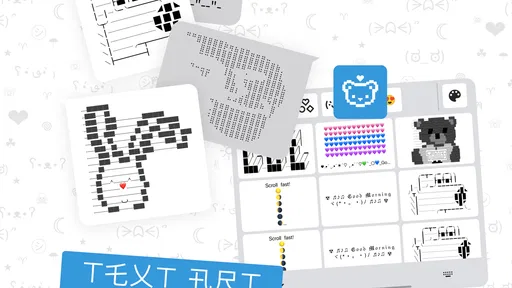
I enjoy customizing a phone most when it adds a bit of personality without turning ordinary tasks into a project. Fonts Keyboard is built around that simple idea: it gives everyday typing a more decorative feel through font styles, symbols, emoji and keyboard themes. I found the appeal less about changing how I communicate and more about having extra ways to make a short message feel suited to the moment.
What the free access means in practice
The app is free to install, so you can explore its keyboard customization without paying an upfront price. There are also in-app purchases, with listed prices ranging from $0.49 to $29.99 per item. I’d treat those as optional purchases rather than assume every style or feature is included at no cost; check what a particular item offers before buying it.
That distinction matters for a keyboard app because the main benefit is personal expression, not a tool you need to complete a task. If the free selection already gives you a few styles you enjoy, you may have little reason to spend anything. If you want more choices, consider whether you’ll actually use them often enough to justify the purchase. The range alone doesn’t tell you what each item includes, so I wouldn’t buy on the assumption that a paid option will transform the whole experience.
A small style change with everyday uses
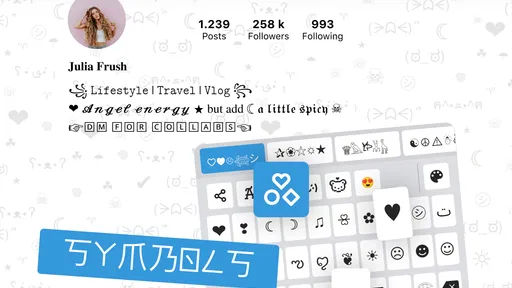
The strongest value here is convenience: font choices, decorative symbols and emoji sit close to the place where you write. Instead of composing a message in one app and moving it elsewhere to dress it up, you can try a style while typing. That makes the app most appealing for casual communication, where a visual flourish can be part of the fun rather than a distraction from the message.
For instance, I might use a more playful style for a birthday greeting, then switch back to plain typing for a work email. The useful habit is to decide on the style before sending, not just because it looks good in the keyboard preview but because it remains easy for the recipient to read. A message can be expressive without making every sentence ornate.
Getting Started with Font Fun
First things first, downloading the Fonts Keyboard app was a breeze. Available on both Android and iOS, I hopped onto my respective app store, clicked download, and was up and running in no time. Once installed, the app guided me through a simple setup process to enable it as my default keyboard. Trust me, even if you’re not the most tech-savvy person, you’ll find this part straightforward.
The Variety is Astonishing
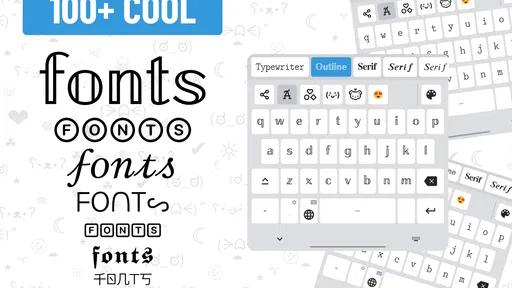
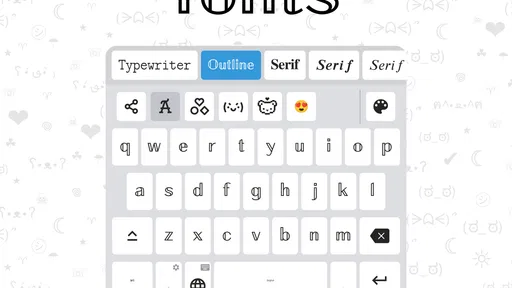
What struck me immediately was the sheer variety of fonts available. From elegant cursives to quirky symbols, there’s something for every mood and occasion. Whether you’re sending a birthday wish or just having a casual chat, there’s a font that fits the bill. I found myself switching fonts more often than I expected, just because it was so fun to see my messages in different styles.
One of the standout features is the app’s ability to preview any font before you decide to use it. This little detail makes it super easy to find the perfect style without any guesswork. Just type your message, scroll through the options, and voilà – instant creativity boost!
Seamless Integration
Now, let’s talk about integration. You’d think that an app like this might slow down your typing or cause glitches, but Fonts Keyboard runs smoothly. Whether you’re texting, emailing, or updating your social media, the app works seamlessly across all platforms. It’s like having a mini design studio right at your fingertips.
I didn’t experience any lag or crashes, which is always a plus in my book. The keyboard feels intuitive, and the transition between different fonts is smooth as silk. Plus, if you ever want to switch back to your default keyboard, it’s as easy as pie.
Customization Galore
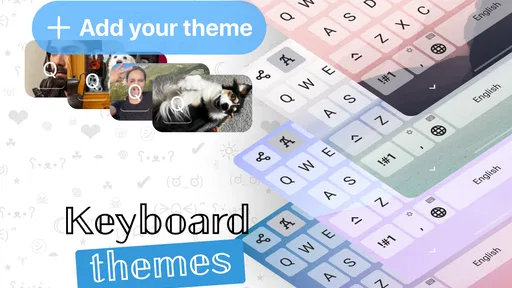
Apart from fonts, the app also offers a range of keyboard themes. Want to match your keyboard to your mood or outfit? No problem! You can choose from a variety of colors and designs. I particularly enjoyed the seasonal themes, which added a festive vibe to my messages.
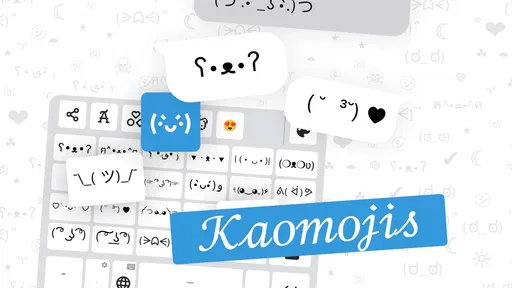
Additionally, if you’re a fan of emojis, there’s a rich collection at your disposal. The app integrates these seamlessly, making it a breeze to express yourself in more ways than one. Emojis and fonts together? Yes, please!
Practical choices before you make it your default
A keyboard is used for much more than playful texts, so I’d give the setup a short trial before relying on it for everything. Try typing a regular message, entering a search, and writing a longer note. That gives you a better sense of whether the decorative options feel like a bonus or whether they get in the way of the plain, fast typing you do most often.
One useful approach is to keep an ordinary style for anything where clarity matters, then reserve more distinctive characters for a short greeting, a profile line or a casual social post. Decorative lettering can look different across apps and devices, and a style that appears charming in a preview may be harder to scan in a long paragraph. I wouldn’t use it to format important instructions or information that someone needs to read quickly.
It also helps to think of the font preview as a selection aid, not a guarantee that every recipient will see precisely the same appearance. When a message matters, send a short test to someone you know or choose a simpler style. That small check can save an awkward follow-up if the text doesn’t display as expected in the other person’s app.
Where it differs from a standard keyboard
The usual alternative is to stick with the keyboard already on your phone and change its theme or text appearance only where a specific app allows it. That route is better if your priority is familiar typing, minimal setup or consistent plain text. Fonts Keyboard makes more sense when you want the decorative choices available during composition rather than treating each message as a separate design task.
It is not a replacement for a full graphic-design app. You can add personality to text, but that is different from laying out a polished invitation or making a graphic with precise control. For a card or poster, I’d use a dedicated design tool; for a quick affectionate message, the keyboard is the more direct option.
Ease of Use and Accessibility
Accessibility is a big deal, and Fonts Keyboard doesn’t disappoint. The app provides a clean, user-friendly interface that anyone can navigate. The settings are easy to adjust, and there’s even a tutorial for those who need a bit more guidance.
It’s also worth mentioning that the app doesn’t bombard you with ads, which is a relief. You can focus on customizing your messages without interruptions. And if you’re someone who loves to tinker, you’ll appreciate the level of control you have over the keyboard’s appearance and function.
Who is likely to get the most from it?
I’d recommend giving it a try if you regularly send informal messages, enjoy changing the look of your phone, or like adding a distinctive touch to short social posts. The combination of font styles, symbols, emoji and themes makes the app more useful to someone who enjoys experimenting than to a person who only wants the fastest route from thought to text.
It may be a poor fit if you prefer the familiar layout of your existing keyboard, rarely use decorative text, or need a consistent, highly readable style for most of your writing. Switching keyboards is a small adjustment, but it still affects a task you repeat throughout the day. If a new keyboard makes you hesitate or slows down routine typing, its visual extras may not be worth keeping enabled.
For a realistic day-to-day example, imagine writing a quick message to a friend during a break, then replying to a practical work question a few minutes later. The first message might suit a playful font and emoji; the second is better kept simple. I like that this kind of app can make the first exchange feel more personal, but I wouldn’t let decoration become the default for every conversation.
How the app fits its category
As a personalization app from Fonts Keyboard, it focuses on changing the look of what you type rather than changing the phone’s overall interface. It has an average rating of 3.9 from around 1.3 million ratings, with about 17,000 written reviews, and has passed 100 million installs. Those figures suggest broad interest, but they don’t tell me whether it will suit your typing habits; the best test is whether you enjoy using its styles after the novelty wears off.
It is free to download and is rated for Everyone. The app was released on August 21, 2019, and its current version is 5.0.89.52075, with Android 6.0 as the minimum operating system. Those details make it easier to check basic compatibility, while the in-app purchase range is a reminder to look at an item’s price before choosing it. I’d start with the free experience and decide from actual use rather than paying in advance for options I may not need.
Final Thoughts
All in all, Fonts Keyboard is a delightful app that adds a splash of creativity to everyday communication. Whether you’re a font fanatic or just someone looking to spice up their texting game, this app is worth checking out. It’s easy to use, packed with features, and it integrates seamlessly into your daily routine.
So, if you’re ready to add a bit of flair to your messages, give Fonts Keyboard a try. It’s a small change that can make a big difference, and who doesn’t love a little extra fun in their day?
My buy-or-skip verdict
I’d try it if you want expressive text close at hand and are happy to begin with the free version. I’d skip it if your main goal is a no-frills keyboard, or if decorative text is something you’d use only once in a while. The paid items could be worthwhile for someone who keeps finding styles they genuinely use, but I wouldn’t treat optional purchases as necessary to get started.
My practical recommendation is to install it, test a few styles in the kinds of messages you actually send, and keep it only if the extra choice feels enjoyable rather than fussy. That is the real measure of value here: not how many designs you can browse, but whether the keyboard makes your everyday writing feel a little more like your own.
Verdict
Strengths of Fonts Keyboard
- Wide variety of fonts to choose from.
- Easy to switch between fonts quickly.
- User-friendly interface for all ages.
- Compatible with most social media apps.
- Customizable keyboard layouts available.
Limitations of Fonts Keyboard
- May slow down older devices.
- In-app purchases for premium fonts.
- Some fonts may not display correctly.
- Occasional ads can interrupt typing.
- Limited free font options.
Similar Picks in This Category
View All
Microsoft SwiftKey AI Keyboard
SwiftKey4.3

Wallpapers
Google LLC4.1

Zedge™ Wallpapers & Ringtones
Zedge4.7

Yandex Browser with Alice AI
Direct Cursus Computer Systems Trading LLC4.3

Ringtone Maker:create ringtone
Big Bang Inc.4.7

Neon Love Theme
Delicate theme for Android App4.6
Frequently Asked Questions
What is Fonts Keyboard and how does it work?
Fonts Keyboard is a mobile application that enhances your typing experience by allowing you to use a variety of stylish fonts across various apps. Once installed, it integrates seamlessly with your device's keyboard, enabling you to switch fonts with a few taps. It’s perfect for adding a personal touch to your messages, social media posts, and more.
Is Fonts Keyboard safe to use on my device?
Yes, Fonts Keyboard is designed with user privacy and security in mind. It doesn’t store or access any of your personal data or keystrokes. However, as with any app that interacts with your keyboard, it's wise to review the privacy policy and permissions before installation to ensure it aligns with your comfort level.
Does Fonts Keyboard support all apps on my phone?
Fonts Keyboard works with most popular apps, including messaging apps, social media platforms, and email. However, some apps may have limitations on custom fonts due to their own restrictions. It’s always a good idea to test the keyboard in your frequently used apps to ensure compatibility.
Are there in-app purchases or ads in Fonts Keyboard?
Fonts Keyboard is free to download and use, but it may include in-app purchases and ads. These purchases typically unlock additional fonts and features, while ads help support the developer. Users can usually opt for a premium version to remove ads and access exclusive content.
How do I install and set up Fonts Keyboard on my device?
After downloading Fonts Keyboard from your app store, you’ll need to enable it in your device’s settings. This usually involves navigating to the keyboard settings and selecting Fonts Keyboard as your input method. The app provides step-by-step instructions to guide you through the process, making it simple and user-friendly.
